Experimental UV Mapper for GP2
Posted: Thu Jun 04, 2026 10:46 pm
Download page
Source code
So, this has been a pain to carset creators since the 90s lol. You create a carshape that looks like the car you want to make, then you create the painting and export it to GP2 with GP2Edit, and in game many parts of your paiting look distorted because the template is for the original 1994 F1 car. The carshape has many 3D faces and GP2 uses a particular slice of the car painting to each face. So if a small square face became a wide rectangle in your carshape, its square slice of the car image will appear stretched in the game.
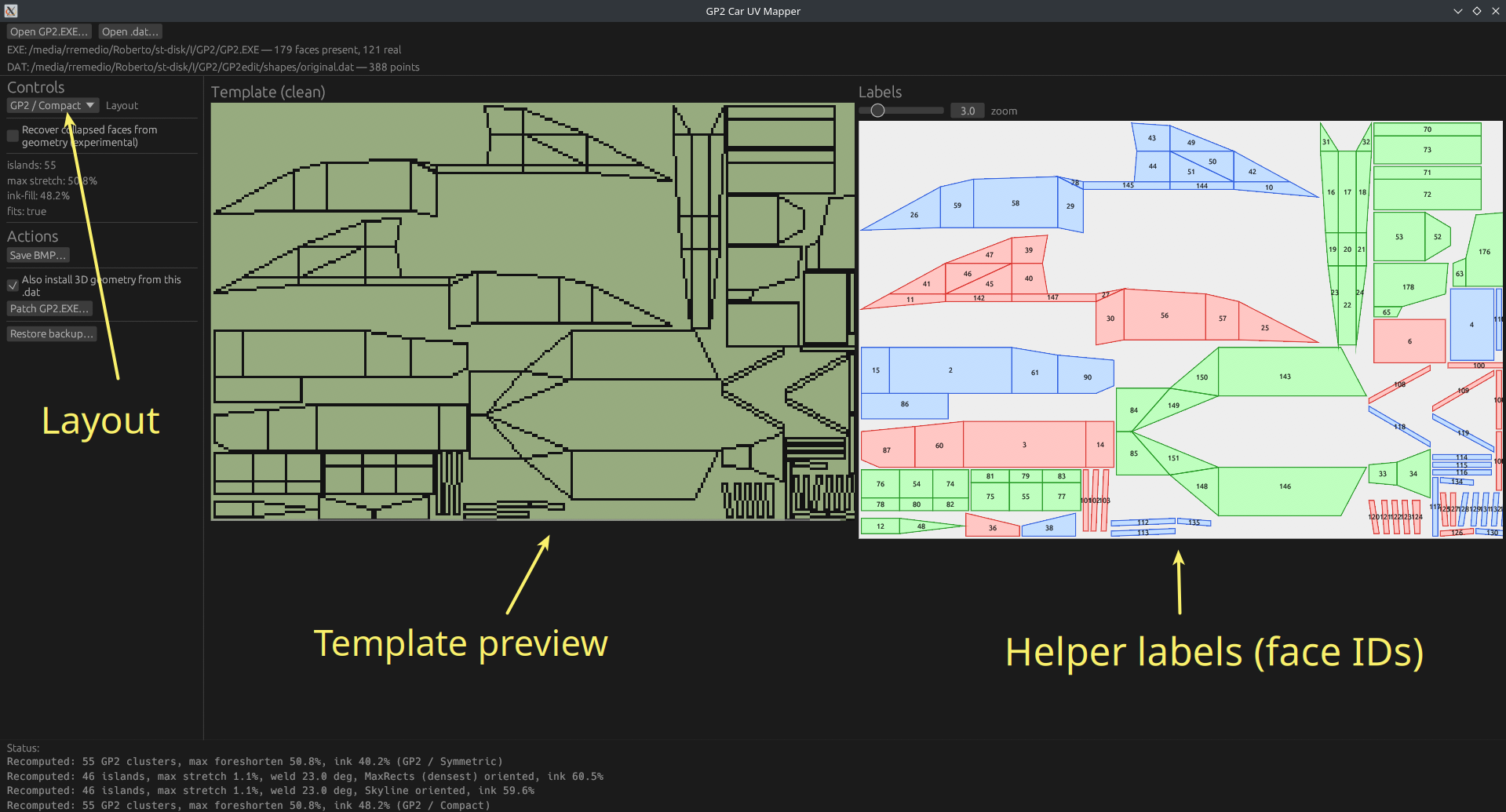
This tool aims to recalculate the correct slicing and update the table inside GP2.exe that keeps that data. You just need to load the exe and your carshape, select the layout you want and export it to the game. It can also export a template with a wireframe so you can paint the car with the new layout. There's a helper image too that tells the face number for each slice of the image (when in doubt, you can select the face number in the car editor texture data and see where that face is).
There are three layouts:
- GP2 Symmetric tries its best to do the same as the original template. It divides the image in three sections, one for top-down slices and one for each side of the car. It is never as good as the original cause the original was probably designed by hand and not by a software like this.
- GP2 Compact ditches the three sections and try to use more space so the faces are bigger and you can add more detail to them. I think it is the best, but it will be harder to work with them the symmetric because it is less organized
- Dense allows you to pick between 3 algorithms that don't care about organization in any way. This was my first try and they are very hard to work with. But I left them there in case someone finds any use for them
There's also an option to "recover collapsed faces". Some extreme carshapes (touring cars, 60s cars, etc) sometimes collapse/degenerate faces and my algorithms miss them. This will make another pass and find them. For each carshape you should look at the car editor and decide if you need them or not.
Side effects: loading images created with these templates into GP2Edit will make its 3D viewer look terrible. Exporting them to GP2 will make textured preview in the car editor also look terrible.
I'm not very talented at paiting cars and I take a long time to do so. That's why there is no example of this in use in the game yet (hopefully I can create one in the next few days), but I know some of our community members can create wonders from this.
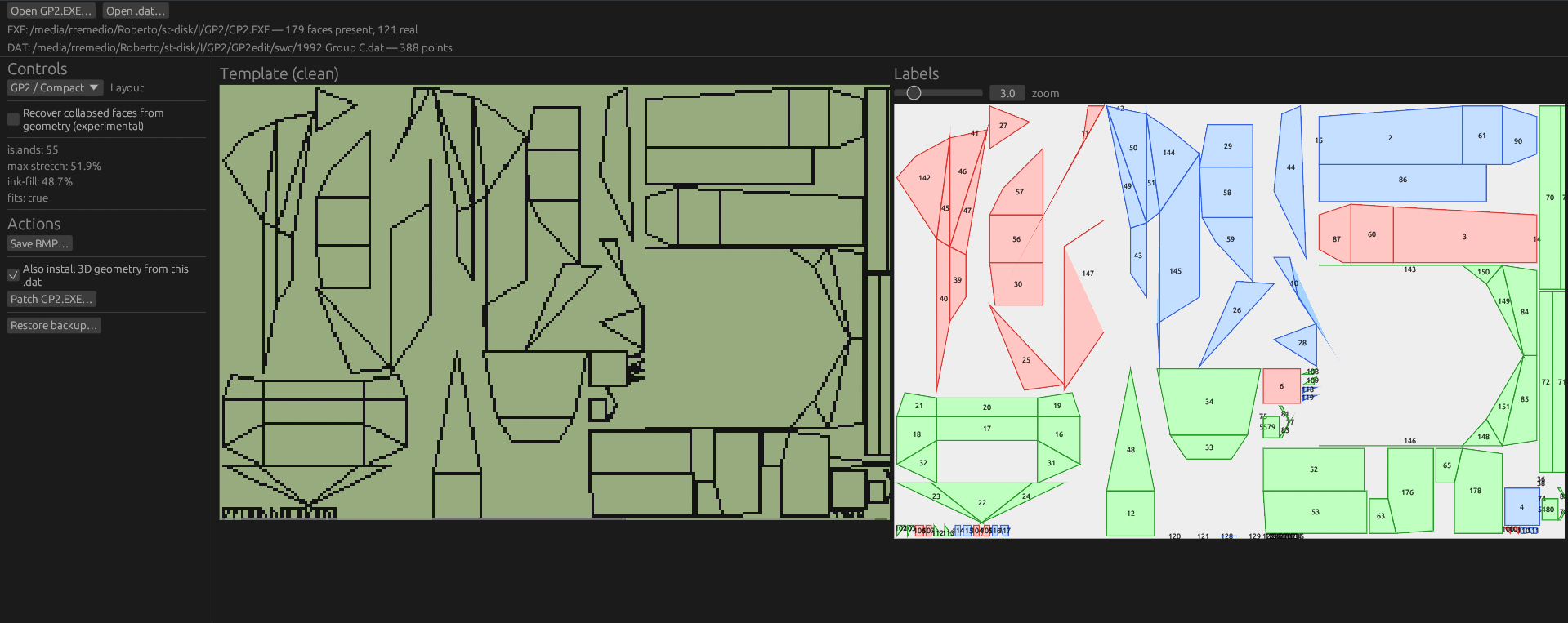
Example with Group C car:
Source code
So, this has been a pain to carset creators since the 90s lol. You create a carshape that looks like the car you want to make, then you create the painting and export it to GP2 with GP2Edit, and in game many parts of your paiting look distorted because the template is for the original 1994 F1 car. The carshape has many 3D faces and GP2 uses a particular slice of the car painting to each face. So if a small square face became a wide rectangle in your carshape, its square slice of the car image will appear stretched in the game.
This tool aims to recalculate the correct slicing and update the table inside GP2.exe that keeps that data. You just need to load the exe and your carshape, select the layout you want and export it to the game. It can also export a template with a wireframe so you can paint the car with the new layout. There's a helper image too that tells the face number for each slice of the image (when in doubt, you can select the face number in the car editor texture data and see where that face is).
There are three layouts:
- GP2 Symmetric tries its best to do the same as the original template. It divides the image in three sections, one for top-down slices and one for each side of the car. It is never as good as the original cause the original was probably designed by hand and not by a software like this.
- GP2 Compact ditches the three sections and try to use more space so the faces are bigger and you can add more detail to them. I think it is the best, but it will be harder to work with them the symmetric because it is less organized
- Dense allows you to pick between 3 algorithms that don't care about organization in any way. This was my first try and they are very hard to work with. But I left them there in case someone finds any use for them
There's also an option to "recover collapsed faces". Some extreme carshapes (touring cars, 60s cars, etc) sometimes collapse/degenerate faces and my algorithms miss them. This will make another pass and find them. For each carshape you should look at the car editor and decide if you need them or not.
Side effects: loading images created with these templates into GP2Edit will make its 3D viewer look terrible. Exporting them to GP2 will make textured preview in the car editor also look terrible.
I'm not very talented at paiting cars and I take a long time to do so. That's why there is no example of this in use in the game yet (hopefully I can create one in the next few days), but I know some of our community members can create wonders from this.
Example with Group C car:
